
Static site search with Pagefind and the Spider CLI
Crawl your own site with the Spider CLI, index the output with Pagefind, and ship full-text search as static files. No search service, no monthly bill.
Add full-text search to any static website using Pagefind and the Spider CLI.
Introduction
Hosted search costs money per index and per query, and a static site rarely needs it. Pagefind builds a search index out of rendered HTML and serves it as static files, so the search runs in the reader’s browser with no backend to keep alive.
The part Pagefind does not do is get the HTML. That is what the Spider CLI is for. Point it at a local dev server or a live domain, and it writes every crawled page to disk for Pagefind to index. Your pages can come from any generator or CMS, since the crawler only sees the rendered output.
Prerequisites
Before starting, ensure you have Rust installed on your machine.
Installation
First, install the necessary modules:
cargo install spider_cli
cargo install pagefind
Indexing your website
Replace localhost:3000 with your website’s URL, whether it’s local or remote.
To index your website with Spider and Pagefind, and create the necessary files in your public directory, run the following command:
# download all the contents to disk
spider --url ${DOMAIN_NAME:-https://spider.cloud} download
# run pagefind index
pagefind --source _temp_spider_downloads --bundle-dir public/_pagefind
# copy files to public folder
cp -R _temp_spider_downloads/public/_pagefind public
# cleanup dir
rm -R _temp_spider_downloads/public
Alternatively, you can use the auto-pagefind package. First, install it:
cargo install auto-pagefindThen run the following command to index:
auto-pagefind -u http://localhost:3000Example of the output:
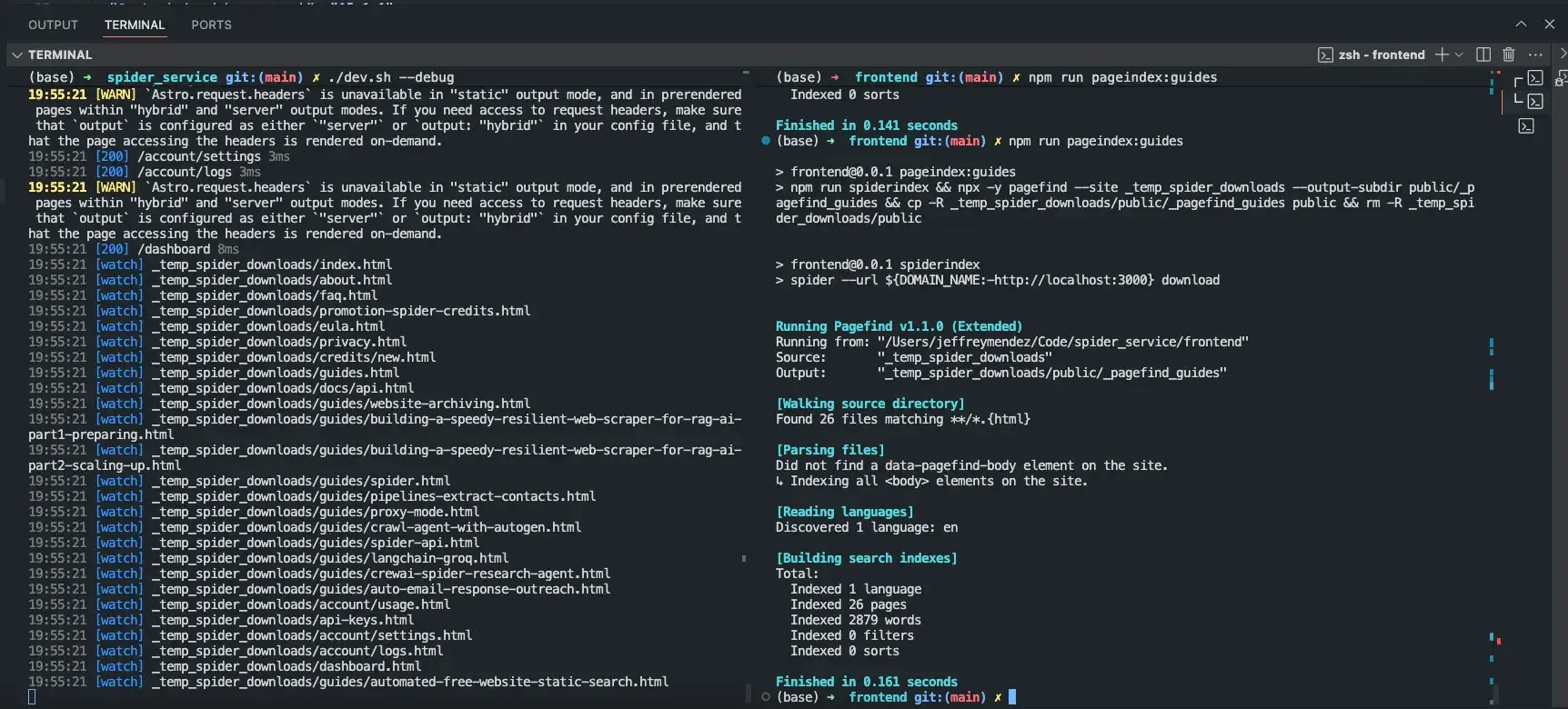
Spider crawls the site and Pagefind indexes it. Millions of pages within seconds.
Importing Pagefind script and CSS
To load the Pagefind script in your HTML, add the following code to your <head> section:
<script src="/_pagefind/pagefind-ui.js" type="text/javascript" defer></script>
<link href="/css/_pagefind.css" rel="stylesheet" />
<link href="/_pagefind/pagefind-ui.css" rel="stylesheet" />
The custom _pagefind.css file:
:root {
    --pagefind-ui-scale: 1;
    --pagefind-ui-primary: #034ad8;
    --pagefind-ui-text: #393939;
    --pagefind-ui-border-width: 2px;
    --pagefind-ui-border-radius: 8px;
    --pagefind-ui-image-border-radius: 8px;
    --pagefind-ui-image-box-ratio: 3 / 2;
    --pagefind-ui-font: sans-serif;
    --pagefind-ui-placeholder: #000;
    --pagefind-ui-link: #1152d2;
}

:root.light {
    --pagefind-ui-scale: 1;
}

:root.dark {
    --pagefind-ui-scale: 1;
    --pagefind-ui-primary: #eeeeee;
    --pagefind-ui-text: #eeeeee;
    --pagefind-ui-background: #152028;
    --pagefind-ui-border: #152028;
    --pagefind-ui-tag: #152028;
    --pagefind-ui-placeholder: #fff;
    --pagefind-ui-link: rgba(59,130,246, 1);
}


.pagefind-ui__results-area  > .pagefind-ui__results {
    max-height: 50vh;
    overflow: auto;
    text-align: left;
}

.pagefind-ui__result > .pagefind-ui__result-inner > .pagefind-ui__result-title > a.pagefind-ui__result-link {
    color: var(--pagefind-ui-link);
}

.pagefind-ui__form > .pagefind-ui__search-clear:hover {
    color: var(--pagefind-ui-placeholder);
}

.pagefind-ui__form > .pagefind-ui__drawer > .pagefind-ui__results-area {
    margin-top: auto;
}

.pagefind-ui__search-input::placeholder {
    color: var(--pagefind-ui-placeholder);
    opacity: 1;
}

.pagefind-ui__result > .pagefind-ui__result-inner > .pagefind-ui__result-excerpt {
    padding: 0.2em;
    margin-top: auto;
    text-overflow: ellipsis;
    overflow: hidden;
}

.pagefind-ui {
    --pagefind-ui-scale: 0.75;
    --pagefind-ui-background: hsl(var(--input));
    --pagefind-ui-text: hsl(var(--foreground));
    --pagefind-ui-border: hsl(var(--border));
    --pagefind-ui-border-width: 1px;
    --pagefind-ui-border-radius: var(--radius);
    --pagefind-ui-font: var(--aw-font-inter), sans-serif;
    width: 100%;
}

.pagefind-ui .pagefind-ui__drawer:not(.pagefind-ui__hidden) {
    position: absolute;
    min-width: 50vw;
    /* left: 0; */
    right: 0;
    margin-top: 0px;
    z-index: 9999;
    padding: 0 2em 1em;
    overflow-y: auto;
    box-shadow:
        0 10px 10px -5px rgba(0, 0, 0, 0.2),
        0 2px 2px 0 rgba(0, 0, 0, 0.1);
    border-bottom-right-radius: var(--pagefind-ui-border-radius);
    border-bottom-left-radius: var(--pagefind-ui-border-radius);
    background-color: var(--pagefind-ui-background);
}

.pagefind-ui .pagefind-ui__result-link {
    color: var(--pagefind-ui-primary);
}

.pagefind-ui .pagefind-ui__result-excerpt {
    color: var(--pagefind-ui-text);
}

@media (any-pointer: coarse) {
    .pagefind-ui__result-title {
      text-align: center;
    }
}
Implementing search component in React
You can use a pre-made React component that is fully customizable. First, install the package:
npm i pagefind-react --saveThen, use the following React component:
import { PageFind } from "pagefind-react";

<PageFind />
Or you can copy the code below and use your own file type like Astro or Svelte.
import { type SyntheticEvent, useEffect, useRef, useState, startTransition } from 'react';
import { Search } from 'lucide-react';

// Re-usable classes
const PAGE_FIND_DRAWER_ID = '.pagefind-ui__drawer';
const PAGE_FIND_FORM = '.pagefind-ui__form';

export const PageFind = ({ bundlePath, targetID }: { bundlePath?: string; targetID?: string }) => {
  const [loaded, setLoaded] = useState<boolean>(false);

  const pfFind = useRef<HTMLInputElement | null>(null);

  const textSearch = 'Search';
  const searchText = targetID ? `${textSearch}...` : textSearch;

  useEffect(() => {
    if (pfFind.current) {
      pfFind.current.placeholder = searchText;
    }
  }, [pfFind, searchText]);

  useEffect(
    (_?: SyntheticEvent<HTMLInputElement>) => {
      if (!loaded) {
        let observer: MutationObserver;

        const PagefindUI =
          // @ts-ignore
          typeof window.PagefindUI !== 'undefined' && window.PagefindUI;

        if (PagefindUI) {
          try {
            const findID = targetID ? `#${targetID}` : '#search';

            new PagefindUI({
              element: findID,
              resetStyles: false,
              showImages: false,
              showEmptyFilters: false,
              bundlePath: bundlePath ?? '/_pagefind_guides/',
            });

            startTransition(() => {
              setLoaded(true);
            });

            const pagefindDrawer = document.querySelector(
              findID ? `${findID} ${PAGE_FIND_DRAWER_ID}` : PAGE_FIND_DRAWER_ID
            );

            if (pagefindDrawer) {
              pagefindDrawer.className = `${pagefindDrawer.className} absolute ${
                targetID ? 'z-30 min-w-[90vw] -right-16 md:min-w-[40vw]' : 'z-20'
              } bg-background px-4 border border-[hsl(var(--md-rule))] pt-2 py-2 md:right-0`;

              const pagefindForm = document.querySelector(
                `${findID} .pagefind-ui > ${PAGE_FIND_FORM}`
              );

              if (pagefindForm) {
                pagefindForm.ariaLabel = targetID ? `${textSearch} Website` : textSearch;
              }

              pfFind.current = document.querySelector(
                `${findID} .pagefind-ui > ${PAGE_FIND_FORM} > .pagefind-ui__search-input`
              );

              let focused = 'no';

              const onFocusInput = () => {
                if (
                  focused === 'backdrop' &&
                  pagefindDrawer.className.endsWith('pagefind-ui__hidden')
                ) {
                  pagefindDrawer.className = pagefindDrawer.className.replace(
                    'pagefind-ui__hidden',
                    ''
                  );
                }
                focused = 'active';
              };

              const onBlurFocusInput = () => {
                focused = 'blured';
              };

              const domCaptureClick = (e: MouseEvent) => {
                const targetElement = e && (e.target as HTMLElement | null);

                if (targetElement) {
                  if (
                    typeof targetElement.className === 'string' &&
                    targetElement.className.startsWith('pagefind-ui__')
                  ) {
                    return;
                  }
                  if (
                    pagefindDrawer.className &&
                    !pagefindDrawer.className.endsWith('pagefind-ui__hidden')
                  ) {
                    pagefindDrawer.className = `${pagefindDrawer.className} pagefind-ui__hidden`;
                    focused = 'backdrop';
                  }
                }
              };

              if (pfFind.current) {
                document.addEventListener('click', domCaptureClick);
                pfFind.current.addEventListener('focus', onFocusInput);
                pfFind.current.addEventListener('blur', onBlurFocusInput);
                pfFind.current.placeholder = searchText;
                pfFind.current.ariaLabel = searchText;
              }

              const guidesContainer = document.getElementById('articles-container');

              const callback = () => {
                const links: NodeListOf<HTMLAnchorElement> = pagefindDrawer.querySelectorAll(
                  '.pagefind-ui__result-link'
                );

                if (guidesContainer) {
                  guidesContainer.ariaHidden = links.length ? 'true' : 'false';
                }

                for (const link of links) {
                  link.href = link.href.replace('.html', '');
                }
              };

              observer = new MutationObserver(callback);

              observer.observe(pagefindDrawer, {
                attributes: false,
                childList: true,
                subtree: true,
              });

              return () => {
                if (loaded) {
                  if (pfFind.current) {
                    document.removeEventListener('click', domCaptureClick);
                    pfFind.current.removeEventListener('focus', onFocusInput);
                    pfFind.current.removeEventListener('blur', onBlurFocusInput);
                  }
                  if (observer) {
                    observer.disconnect();
                  }
                }
              };
            }
          } catch (e) {
            console.error(e);
          }
        }
      }
    },
    [loaded, setLoaded, textSearch, searchText, bundlePath, targetID, pfFind]
  );

  const preId = targetID ? `${targetID}_pre` : 'target_pre';

  return (
    <>
      {!loaded ? (
        <>
          <label className="sr-only" htmlFor={preId}>
            {searchText}
          </label>
          <div className="flex relative text-xl font-bold place-items-center">
            <Search className="grIcon absolute left-5 w-4 h-4 pointer-events-none text-muted-foreground" />
            <input
              className={`pagefind-ui pagefind-ui__search-input ${
                targetID ? 'max-h-[45px] text-sm' : 'max-h-[45px]'
              } px-12 py-6 text-sm w-full appearance-none border border-[hsl(var(--md-rule))] bg-[var(--pagefind-ui-background)] placeholder:text-muted-foreground`}
              placeholder={searchText}
              type="search"
              id={preId}
              readOnly
            />
          </div>
        </>
      ) : null}
      <div id={targetID ?? 'search'} className={loaded ? undefined : 'sr-only'}></div>
    </>
  );
};
Conclusion
You now have a working static search powered by client-side WebAssembly. The search on this website uses exactly this setup.
Run this on a page you care about
The playground sends the request this page describes and shows you the response. Keyless runs work without an account and are rate limited.